Welcome to AAMA - the Afro-Asiatic Morphology Archive.
Getting Started(v8)
Overview
- 1. The AAMA Project
- 2. Install required software
- 3. Configure Application
- 4. Run Application
- 5. Remote Data and Webapp Update
Appendix 3: Source Bibliography
Details
-
1. Introduction: The AAMA Project
The purpose of the AAMA Project is to create a morphological archive whose data can be:
- curated (edited/created) -- and hopefully shared!
- inspected
- manipulated
- queried
- compared
The archive itself is neutral as far as the use it is put to is concerned: comparison, reference, diachronic and synchronic research, pedagogical, . . . But ultimately it is hoped that the archive will make available and comparable the major morphological paradigms of a wide variety of A froasiatic languages in all the major families and in the longer term help situate these morphologies with respect to one another within Afroasiatic. Ultimately we hope also that the archive and its accompanying software may serve as a tool for exploration of typology and structure of the form of linguistic organization known as the paradigm.
As presently configured tha AAMA project consists of three interconnected modules:
-
1.1 Data Files
The base component of the archive is an extensible collection of morphological paradigms in a consistent and comparable format from a large selecton of Afroasiatic languages. The data in itself is application-neutral, and could be cast into any plausible datastore format, and used in conjunction with tools and query-and-display applications constructed using any appropriate programming tools.
As an initial step presently archived data-files cover principally the verbal and pronominal morphological paradigms of thirty-three Cushitic and six Omotic languages as represented in a selection of currently avaliable monographic and scholarly publication (see bibliography). In addition there are files with parallel sample data covering five Semitic languages and two varieties of Egyptian taken for the moment from standard texts -- limited Berber and Chadic data is in the process of being entered. The intention behind the project is, with the help of collaborators, to extend the scope of the archive to include eventually as complete a representation as possible of all branches of the Afroasiatic language complex.
Nominal paradigms are systematically included in the archive whenever they have been present in the underlying monographic source. However we have found that Cushitic-Omotic nominal morphosyntax does not lend itself as exhaustively to straight-forward word-level paradigmatic treatment as pronominal and verbal. We are experimenting with various consistent ways to systematically treat at least case, number, focus morphosyntax across the archive.
The Paradigm
Informally we can define "Paradigm" in its simplest and most obvious sense as:
- Any presentation of one or more linguistic forms ("tokens": words, affixes, clitics, stems, etc.), which share a set of morphological property/value pairs, and which vary systematically along the values of another set of properties.
For consistency within the archive, we are using JSON as normative/persistent paradigm format, which allows a reasonable, human-readable/-editable approximation to traditional paradigm notation. To illustrate what is by far the most common data-structure in the archive, the paradigm, what traditionally would be termed:
- the number, person gender paradigm of the imperfect affirmative of the Burunge glide-stem verb xaw-'come'
In table form:
Number Person Gender Token Singular Person1 Commo xaw Singular Person2 Common xaydă Singular Person3 Masc xay Singular Person3 Fem xaydă Plural Person1 Common xaynă Plural Person2 Common xayday Plural Person3 Common xayay Our normative/persistent data format, JSON, is a rigorously defined system of terms (term), strings ("string"), ordered lists (
[a, b, c, d]),maps/"dictionaries" ({a: b, c: d, . . .}read "the value of property a is b; of property c is d, . . .") and unordered sets (#{a, b, c, d}). It is reliably transformable into a consistent Resource Description Framework (RDF) notation, while at the same time providing a human-readable natural format for data-entry and inspection.Our current JSON structure (cf. below) while open to extension and revision, seems to provide a natural notation for the verbal and pronominal inflectional paradigms encountered in Afroasiatic, and perhaps for inflectional paradigms generally.
Paradigms are formally rendered in AAMA's JSON format by a nested data-sturucture, we call ":termcluster": where entities are either labels/indices or data strings (enclosed in quotes); where square brackets ( "[ ]") enclose lists and braces("{ }") enclose indexed lists ("dictionaries"). So that the paradigm just seen in table form woud be rendered by the following data structure:
{"termcluster":   {"label": "burunge-VBaseImperfGlideStemBaseForm-xaw",
                 "note": "Kiessling1994 ## 7.2.2,7.2.3",
                 "common": {
                          "tam": "Imperfect"
                          "polarity": "Affirmative",
                          "stemClass": "GlideStem",
                          "pos": "Verb",
                          "lexeme": "xaw",
                          },
                          "terms": [["number", "person", "gender", "token"],
                                  ["Singular", "Person1", "Common, "xaw"]
                                  ["Singular", "Person2", "Common, "xaydă"],
                                  ["Singular", "Person3", "Masc, "xay"]
                                  ["Singular", "Person3", "Fem, "xaydă"]
                                  ["Plural", "Person1", "Common, "xaynă"],
                                  ["Plural", "Person2", "Common, "xayday"],
                                  ["Plural", "Person3", "Common, "xayay"]]
                  }
 }
Here, "termcluster" is itself an indexed list, with a unique "label" nd a "note" property, which always indicates at least the paradigm's published source, in addition to other possible properties; "common" is an indexed list of the morphological property=value pairs common to every member of the paradigm ("tam=Imperfect", "polarity=Affirmative", "stemClass=GlideStem", "pos=Verb", "lexeme=xaw"), and the list of lists "terms" has as its first member a list of the paradigm term properties (= paradigm column heads), while each subsequent member list contains the values, in order, of the properties.You will observe that we rigorously follow the convention of referring to properties in lower-case, while values are always capitalized.
Any or all the the data files can be downloaded from the AAMA site, and corrections to the existing files and submission, for on-line sharing, of new language files are hereby sollicited!
Note on Paradigm Labels in AAMA
In this application, for the purposes of display, comparison, modification, in the various select-lists, checkbox-lists, and text-input fields, paradigms are labeled as a comma-separated string of the shared value components of the paradigm. The property associated with each value is automatic, since we follow the convention that no two property names share an identical value name. If the properties whose values consititute the rows of the paradigm are not
number, person, case. gender(far and away the most frequent case), they are given in a comma-separated list after a delimiter '%'. In the, frequently long, paradigm lists automatically generated from the JSON file by the "Create Paradigm Lists" utility, for ease in processing the first two properties are always pos (part-of-speech) and morphClass, and, for ease in reading the 'property=' part of the label is omitted. Thus the full form of the label of the paradigm illustrated above would be:pos=Verb,lex=xaw,polarity=Affirmative,stemClass=Glide,tam=Imperfect%number,person,gender
In paractical paradigm-lists it would be appear as:Verb,xaw,Affirmative,Glide,Imperfect
and might occur in a list as:
.  .  .
Verb,qadid,Affirmative,DentalStem,Perfect
Verb,qadid,Affirmative,DentalStem,Subjunctive
Verb,xaw,Affirmative,GlideStem,Imperfect
Verb,xaw,Affirmative,GlideStem,Perfect
Verb,xaw,Affirmative,GlideStem,Subjunctive
. . .
-
1.2 A Resource Descripton Framework (RDF) Datastore and Related Tools
The data archive will hopefully serve a number of research and reference purposes. One such purpose is the creation of a query-able datastore, which will enable easy manipulation and combination and comparison of morphological information within and between different languages and language families. To this end we have elected to set up such a datastore using the W3C-sanctioned format.
Very good introductions to RDF datastores and the associated SPARQL query language can be found in their respective W3C home sites. But, very basically, RDF involves:
- Identifying units of information, and assigning them URL-like
unique Uniform Resource Identifiers (URI)
-- on URI ; see especially
Tim Berners-Lee 1994
and much subsequent literature
on the value and necessity of assigning to each resource a unique
identifier.
For example, in a paradigm cited above from the burunge-pdgms.json file one of the possible values of the property tam (TenseAspectMode) is Imperfect. In the correspnding full rdf/xml format file beja-arteiga-pdgms.rdf file, we have assigned to the property tam the full URI:
<http://id.oi.uchicago.edu/aama/2013/burunge/tam>
where the first part of this URI will be common to all Burunge morphological properties and values. In the more readable TTL RDF notation format, this URI would be notated:
brn:tam
while the Burunge TTL file would contain in a brief abbreviation section (typically five to ten items) the entry:@prefix brn: <http://id.oi.uchicago.edu/aama/2013/burunge/>
Similarly, the value Imperfect, which has the URI:
<http://id.oi.uchicago.edu/aama/2013/burunge/Imperfect>
would be in more widely used
ttlnotation:brn:Imperfect
- Representing the complex pieces of information involving these
concepts by organizing these conceptual units into tripartite
statements called 'triples'
Triples are conventionally noted:
s p o .
and usually, but without semantic prejudice, read:
'subject' 'predicate' 'object' .
For example, as one might expect, an extremely common triple in a datastore like AAMA is of the form:
paradigmTermID-s hasProperty-p withValue-o .
Thus if the first term of the JSON paradigm given above had the pdgmTermID aama:d3c483b1 one of the (many) triples descibing it would be (in the
ttlnotation):aama:d3c483b1 brn:tam brn:Imperfect .
Where aama: is the
ttlabbreviation for<http://id.oi.uchicago.edu/aama/2013/>
And the ttl representation of the first row of the paradigm might be:
aama:d3c483b1 brn:number brn:Singular .
aama:d3c483b1 brn:person brn:Person1 .
aama:d3c483b1 brn:gender brn:Common .
aama:d3c483b1 brn:token  "xaw" .
stating that 'the :person property of the term has the value :Person1'
. . . and so forth. A good way to see practically the relation between the JSON data file and its RDF transform is to take a look at a paradigm of interest in the JSON and TTL versions of a language data file of interest: e.g.
burunge-pdgms:{termclusters:[{label:"brn-VerbGlideStem-xaw-ImperfectAffirmative"}]}and its corresponding RDF transformation in the burunge-pdgms.ttl file.
Not surprisingly it takes a very large number of triples to describe even a moderately large datastore (AAMA on a recent count had 987,911). But they are very rapidly produced and indexed (a few seconds per language using the AAMA pdgmDict-json2ttl.py program), efficiently stored, and permit extremely quick adccess to information for display, comparison, manipulation, and reasoning. As mentiond, among the RDF tools in the on-line material, there is a Python script for transforming the (JSON) data files into appropriate RDF datastore (ttl) format, and a set of scripts to upload data files to a local Fuseki RDF server.
Transformation of morphological properties and values to formal URIs, and organization into sets of triples is necessary in order to build a SPARQL-queriable datastore, and also valuable for distinguishing terminologies and building nomenclatures and ontologies. But in practice, although RDF is an extremely interesting topic in itself, running the relevant scripts for transforming, adding to, or correcting archive-data from the json files (usually done via an application menu choice), requires no special knowledge about RDF datastores. Some knowledge of the structure of an RDF datastore and the SQL-like SPARQL query language however IS required if you want, for example, to submit a new genre of query to the datastore in order to extract new information.
Pending an on-line publicly accessible datastore, you can set one up on your own computer. Instructions are given below for setting up the Fuseki RDF server on an individual machine, and loading the data into it.
- Identifying units of information, and assigning them URL-like
unique Uniform Resource Identifiers (URI)
-- on URI ; see especially
Tim Berners-Lee 1994
and much subsequent literature
on the value and necessity of assigning to each resource a unique
identifier.
1.3 Query/Display User Interface
The directory 'webappy' contains a set of Python scripts which constitute the elements of a rather basic 'proof-of-concept' application1 with a prototype interface:
- A set of Python scripts which index the paradigm files, set up the material for the menu
and select lists and input forms, and programmatically transform the JSON files into
ttl. These are principally:
pdgmDict-schemata.py pdgmDict-lexemespy pdgmDict-pvlists.py pdgmDict-json2ttl.py - A set of shell scripts to launch the Fuseki datastore and add new or corrected data to it, and
to upload or download new or corrected data to or from the remote repository:
fuseki.sh
aama-datastore-update.sh
aama-cp2lngrepo.sh
aama-pulldata.sh
-
A set of Python scripts to choose, display, and manipulate morphological material within
and between language families. For the moment we are using the native Python
Tcl/tk-derived tkinter graphic library, although we plan to return to a unified menu-based
browser application, similar to our earlier Clojure-based application. The principal Python
scripts in this version are::
pdgmDisp-baseApp-PDGM.py
pdgmDisp-baseApp-GPDGM.py
pdgmDispUI-formsearch.py
These scripts generally work as follows:- They gather requested language and morphological property and value information via an array of form selection-list, checkbox, and text-input mechanisms;
- formulate them into a SPARQL query,
- which is submitted to the datastore, returning a CSV response,
- which in turn is typically formatted into one or more tables using 'pandas' and other Python libraries.
Below we give instructions for downloading, launching, and initializing the app. More details on the scripts are available in the aama/webappy README . Also, a brief demo video of an earlier HTML/CLOJURE version can be seen at AAMA DEMO
- A set of Python scripts which index the paradigm files, set up the material for the menu
and select lists and input forms, and programmatically transform the JSON files into
ttl. These are principally:
-
2. How to Install the Required Software
Although we plan for the AAMA digital application to be hosted on a site where its data can be consulted, and to a certain extent manipulated, online we anticipate that most users will want to download the application and a selection (or all!) of the data, and work with it on their own machine, perhaps including data of their own, which they might wish to propose uploading to the home site, along with proposals for modifications and additions to the data-manipulation software.
At the moment, pending the creation of an appropriate executable what we can propose, in addition to the downloading of a choice of the data files of interest, is the downloading and running of the set of scripts which constitute the application.
Note on Git client
The AAMA project uses GitHub to store data and tools; you will need a git client in order to download the tools repository and the data repositories you are interested in. Follow the instructions at SetUp Git.Note that you do not need to create a github account unless you want to edit the data or code. Instructions for how to do that are below.
-
2.1 Set up aama directory
We will assume that the data is placed in a directory called 'aama-data' and application software is to be placed in a directory called 'webappy'. So create and switch to an
aamadirectory structure on your local drive, e.g.~/ $ mkdir aama-data ~/ $ mkdir webappy ~/ $ cd webappy ~/webappy/ $ mkdir bin ~/ $ cd aama-data ~/ $ aama-data/mkdir data -
2.2 Install Apache Jena Fuseki
Fuseki is the SPARQL server we are using to query the dataset. Download the current
apache-jena-fuseki-n-n-n distributiondistribution (either the zip file or the tar file; NB, make sure your Java JDK is up-to-date with the download) and store it in a convenient location.~/jenais a good place. The following steps will install theaamadataset and verify that it runs. Futher information about Fuseki, as well as information and links about RDF linked data and the SPARQL query language can be found at the Apache Jena site. -
2.3. Download data
Take a look at the Aama repositories and decide which languages interest you. In general we use one repository per language, or in some cases, language variety, e.g. beja-hud is the variety of Beja described by Richard Hudson in Hudson1967, while beja-van is the variety of Beja described by Martine Verhove in Verhove2014 etc.
Now you need to download the data to your local harddrive. Create a
datadirectory inside theaamadirectory, e.g.~/aama $ mkdir data. Then clone each language repository into the data directory:~/ $ cd aama-data/data ~/aama-data/data $ git clone https://github.com/aama/afar.git ~/aama-data/data $ git clone https://github.com/aama/geez.git ~/aama-data/data $ git clone https://github.com/aama/yemsa.git
Alternatively, you can create a personal github account, fork the aama repositories (copy them to your account), and then clone your repositories to your local drive. See Fork a Repo for details.
-
2.4. Download Application Code
In the
~/webappydirectory, clone the aama github application repository:~/aama $ git clone https://github.com/aama/webappy.git
The Python scripts (
. . . .py) will remain in this directory, while the shell and query scripts (. . . .sh.. . . .qr) should be moved to the~/webappy/binsubdirectory
When you have finished, your directory structure should look like this (assuming you have cloned afar, geez, and yemsa):
   ~/
   |-aama-data/
   |--data/
   |---afar/ afar.json, afar.ttl
   |---geez/ geez.json, geez.ttl
   |---yemsa/ yemsa.json, yemsa.ttl
   |-jena/
   |--apache-jena-fuseki-n.n.n/ aamaconfig.ttl, . . .
   |-webappy/ pdgmDict-schemata.py, . . . ,  pdgmDisp-baseApp.py, . . .
   |---bin: fuseki.sh, . . . list-graphs.rq, . . .
3. Configuring Appication
3.1 Prepare data lists and indices
The schemata and lexemes sections of the downloaded
json files can be transformed to RDF and incorporated innto the datastore
as is. However if any chages are made to the property, value, or lexeme inventories,
the relevant pdgmDict scripts should be run. the pdgmDict-pvlist
script must be run when a language-file is first incorporatd into the datastore in order to
generate a pick-list of paradigms.
- pdgmDict-schemata.py
This script generates a json property:value-list dictionary
pvlists/[LANG]-schemata.jsonto be substituted into the[LANG]-pdgms.jsonfile every time a property or value is added or changed in any way. It also generates a more succinct version of the schemata dictionary,pvlists/[LANG]-pdgm-PVN.txt, which is used in the basic paradigm display, along with the current value of thepdgmPropOrdervariable from the[LANG]-pdgms.jsonfile, and which determines the order of the properties whose values constitute the paradigm 'name'. - pdgmDict-lexemes.py
The lexemes associated with paradigms in the
LANG-pdgms.json(and correspondingLANG-pdgms.ttl) files are identified by alexemeIDwhich could in principle be any arbitrary alphanumeric symbol sequence, but which in practice and for memnonic convenience are lower-ascii approximations of the lexeme's lemma. This script, in conjunction withpdgmDict-lexCheck.pyandpdgmDict-lexRev.py, generates alexemessection consisting of dummy lexeme entries (e.g.,lemma = '[x]', gloss = '[y]') for every lexemeID. This 'lexemes' section must be subsequently filled out by hand (or in an ideal case be linked programmatically with a digital lexicon of the language in question). - pdgmDict-pvlists.py
This script generates a file each paradigm, consisting of a comma-separated list of the values of each of the morphological properties enumerated in the
commonsection of the term cluster - thus uniquely identifying each paradigm within the language, and, with the addition of a language designation, within the whole AAMA paradigm corpus. It also generates twodbfiles,pvlists/[LANG]-pdgmdb.dbandpvlists[LANG]-labldb.db, which link each paradigm 'name' respectively with a full 'property:value' list and a paradigm 'label' more-or-less arbitrarily assigned to the paradigm when the json file was first created.
3.2 Generate RDF data from morphological data files
In order to convert JSON-format data files to TTL ("turtle"
-- a more easily human-readable RDF format), you will
use the pdgmDict-json2ttl.py file in the
webappy directory. The aama-datastore-update.sh
shell script will call aama-ttl2fuseki.sh which in turn
will convert the .ttl file to the rdf-xml which is needed for
uploading to the Fuseki SPARQL service.
For convenience, an already-generated TTL version is included with each language's JSON file. Since the JSON file is the normative/persistant data format, any corrections or additions you want to make should be made in this file; and if any changes are made to the SON file, you must then generate new TTL/RDF files to be uploaded to the SPARQL server. And in fact, as long as you observe the above structure for JSON files, you can create any number of new language files of your own, transform them to RDF format, and upload them to the SPARQL server for querying.
3.3 Upload RDF data to SPARQL service
In order to upload the RDF files to Fuseki, you must first start the server by running:
~/aama $ webappy/bin/fuseki.sh
This script, like the following, assumes that the current version
of Fuseki, for the moment apache-jena-fuseki-3.16.0, has
been placed in the jena directory, and that
the file aamaconfig.ttl has been copied
to the Fuseki version directory; the
scripts should be edited for the correct locations if this
is not the case. When run for the first time, you will notice
that the script, which references the configuration file
aamaconfig.ttl, will have placed a,
for the moment empty, data
sub-directory aama in the
jena/apache-jena-fuseki-3.16.0/ directory.
The following script:
~/aama $ webappy/bin/aama-datastore-update.sh "../aama-datadata/[LANG]"
will load the relevant LANG-pdgms.ttl file in aama-data/data/[LANG]
into the Fuseki server.
It also automatically runs the queries count-triples.rq
("How many triples are there in the datastore?") and
list-graphs.rq ("What are the URIs of the
language subgraphs?"), from the directory
webappy/bin.
If the upload has been successful, you will see an output such as
the following (assuming again that afar, geez, and yemsa are the
languages which have been cloned into aama/data/).
Query: bin/fuquery-gen.sh bin/count-triples.rq
?sTotal
33871
Query: bin/fuquery-gen.sh bin/list-graphs.rq
?g
<http://oi.uchicago.edu/aama/2013/graph/afar>
<http://oi.uchicago.edu/aama/2013/graph/geez>
<http://oi.uchicago.edu/aama/2013/graph/yemsa>
4. Running the Application
The SPARQL service can be accessed to explore the morphological data via two distinct interfaces:-
4.1The Apache Jena Fuseki interface
You can see this on your browser at
localhost:3030after you launch Fuseki. SPARQL queries can be run directly against the datastore in the Fuseki Control Panel on thelocalhost:3030/dataset.htmlpage (select the/aamadataset when prompted). Note that thepdgmDisp-...scripts automatically write to the terminal all SPARQL queries generated in the course of the computation. These queries can be copied and pasted into the Fuseki panel for inspection and debugging. -
4.2 An application specifically oriented to AAMA data
A preliminary menu-driven GUI application, will have already been downloaded following the instructions outlined above in Download data, tools, and application code. This application demonstrates the use of SPARQL query templates for display and comparison of paradigms and morphosyntactic properties and categories. It is written in Python, which has a very engaged community of users who have created a formidable, and constantly growing set of libraries. However essentially the same functionality could be achieved by any software framework which can provide a web interface for handling SPARQL queries submitted to an RDF datastore,
There are at present three major options for paradigm/mmorphology display and manipulation governed by three Python scripts. They can be invoked through a menu choice, or run independently as a Python script. All of them involve lining up a data framework, converting this into a SPARQL query by one of the functions in
pdgmDispQuery.py, running the SPARQL query, and displaying the result in some appropriate format.- A basic paradigm display function
pdgmDisp-baseApp-PDGM.py
has as graphic setup a two-colum display with, in the left column, a language select-list, where a language choice results in a middle box display of the property-value inventory of the language's paradigm set, along with an indication of the order of properties in the value-list names of the paradigm, followed by a select-list of paradigm 'names'. baseApp-PDGM-screen A 'Display Paradigm' button at the bottom of the column results in a sequentially numbered display in the right text-box of the paradigm name, source, notes if present, and the paradigm itself. This can be seen in - A generalization of the notion 'paradigm'
pdgmDisp-baseApp-GPDGM.py
Here we have this same structure of a set of 'common' property-value pairs and a "table" of 'terms', except that for the propertiescommmonandtermsthe set of property-values associated with each is completely at the discretion of the investigator. Obviously the regular paradigms of the 'LANG-pdgms.json' files are a special case of GPDGM displays, as are a very large number ofcommon-termcombinations which do not correspond to any possible or occurring form. But by exploring occurring combinations of interest, including ones which involve distinct languages, this dislay routine opens up the possibility of many potentially interesting and relevant form tables. - A function to search morphological features across the whole datastore
pdgmDisp-formSearch.py
This serves for the comparison of realizations of a given property/value combination in different languages. Two or more languages can be selected from the upper-right language-selection list. In an Entry box below a list of desired property=value combinations can be entered. AFind Formbutton will display a list of paradigms in the designated languages where the property=value combination list occurs. One or more of these paradigms can be selected, and registered by the 'Choose Paradigm' button, and the 'Display Paradigm' button will display the chosen paradigms in the lower right-side text box. Finally the paradigms in question the be combined as in the baseApp script.For example one could want to see whether second-person, feminine, pronominal forms, singular or plural, are distinguished in Arabic and Coptic-Sahidic, and compare the way they are marked. One would choose Arabic and Coptic-Sahidic in the language select-list, enter
person=Person2,gender=Fem,pos=Pronoun,number=?numberin the 'Entry' box, push the 'Find Forms' button and see in the upper right select box the relevant forms, and the label of the paradigm in which each form occurs. One could then select any paradigms of interest and see the full paradigm, sequentially numbered, in the lower right-hand text box. For moore precise comparison one could then go on to 'combine' the paradigms as in the baseApp script.
- A basic paradigm display function
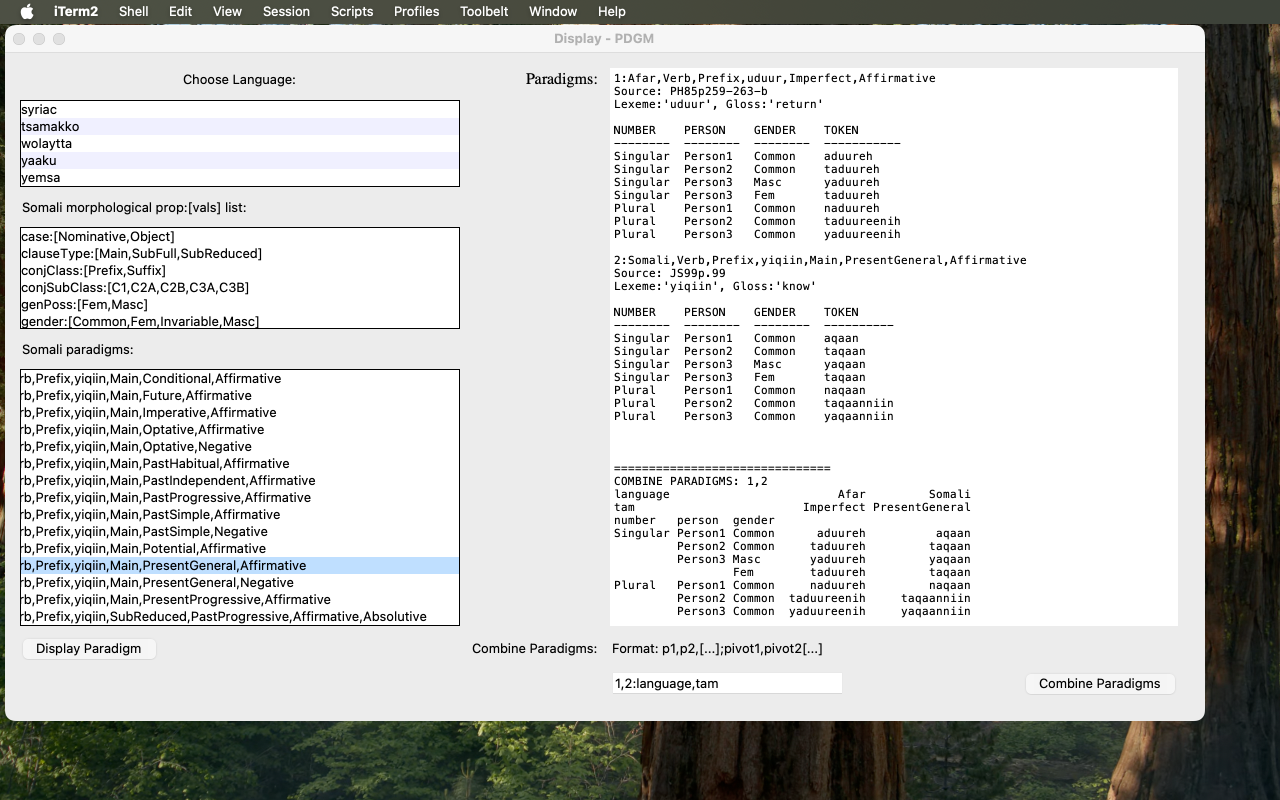
In addition there are:
pdgmDisp-pnames.pysimply enables the uiser to generate and display, presumably on an experimental basis, a "paradigm-name" list in a different order from that dictated by the
pdgmPropOrder feature of the LANG-pdgms.json file.
This function is called by the each of the above scripts to generate the appropriateSPaRQL queries.
pdgmDispQuery.py
Each of the display scripts, 3.1, 3.2, and 3.3,
finds the data it displays by running a SPARQL query against the AAMA datastore.
These queries are formed from the display data request by one or more of the
query() functions contained in this script and which have been imported
into the display script. The query itself, and its CSV output, are
for the moment printed to the terminal (or eventually to a log file).
Remote Data and Webapp Update
AAMA is an on-going project. Its data is constantly being updated, corrected, and added-to; the accompanying webb application is in a process of constant revision. To ensure that your data and web app are up-to-date you should periodically run the following shell scripts, which assume that git has been installed and that the data and webapp have been cloned from the master version in the manner outlined above.
The following script:
~/aama $ webappy/bin/aama-pulldata.sh data/[LANG]
will update the JSON language data file in the
data/[LANG] directory.
While:
~/aama $ webappy/bin/aama-pulldata.sh "data/*"
will update the JSON language data files in all the
data/[LANG] directories.
Once revised (or new) JSON files have been installed, remember to run the appropriate scripts to transform them to ttl format and to load them into the SPARQL server, as outlined above.
Finally, the script:
~/aama $ tools/bin/aama-pullwebappy.sh
will update he files of the web applicagtion.
Appendix 1: The Data Schema
Basic structure:
In outline each language JSON file has the following structure (see any of the LANGUAGE-pdgms.json files for a concrete example, and see below for explanation of terms):
{
|-"lang;"        		"language name"
|-"subfamily;"		"language subfamily name"
|-"lgpref:"       		"string representing 3-character ns prefix used for the
				URI of language-specific morphosyntactic properties
				and values"
|-"datasource:"   	"bibliographic source(s) for the data in the file"
|-"datasourceNotes:" "remarks, if necessary, about darasource"
|-"transcription:"        "remarks, if necessary about how the transcription should be interpreted
				w.r.t. normative AAMA transcription. (The transcription of the 'LANG-					pdgms.json' file is always that of the datasource.)"
|-"geodemoURL:"   	"on-line geo-/demo-graphical information about the language"
|-"geodemoTXT:"   	"short textual summary of geo-/demographcal information"
|-"schemata:" {
				"associative map of each morphosyntactic property used 	                				in the inflectional paradigms with a list of its values">
			}
|-"lexemes:"   {
				"associative map of each paradigmatic 'lexeme'-ID with an indication of
				its lemma, gloss, part-of-speech and possibly other properties relevant to the
				collection of paradigms -- a provisional stand-in for a reference to a true 				digital lexicon".
			}
|-"pdgmPropOrder:"  "list of paradigm properties in the order their values are to be listed in 					paradigm labels  (can be programatically altered)"
|-"termclusters:"   [
				"label-ordered list of term-clusters/paradigms,
                 		  each of which has the structure:"
			      {
|----"label:"    		 "descriptive label assigned to the term-cluster at data-entry"
|----"note:"      		"bibliographic reference to source of paradigm data; plus other
				 remarks, if necessary"
|----"common:"     {
			  	"map of property-value pairs which all members of the
                 		 termcluster have in common"
			     }
|----"terms:"    [[
				"list of lists, the first of which enumerates  the
                		  properties which differentiate individual terms, while   the others list, in   				 order, the value of the i-th
                		 property -- in fact, a property-value-table realization of the distinct property-
                		 value pairs of the lexeme in question"
			   ]
			]
			}
			...
			]
 }
Appendix 2: The Data Files
At present the following data files are available:
- Aari
- Afar
- Akkadian-ob
- Alaaba
- Arabic
- Arbore
- Awngi
- Bayso
- Beja-alm
- Beja-hud
- Beja-rei
- Beja-rop
- Beja-van
- Beja-wed
- Berber-ghadames
- Bilin
- Boni-jara
- Boni-kijee-bala
- Boni-kilii
- Burji
- Burunge
- Coptic-sahidic
- Dahalo
- Dhaasanac
- Dizi
- Egyptian-middle
- Elmolo
- Gawwada
- Gedeo
- Geez
- Hadiyya
- Hausa
- Hdi
- Hebrew
- Iraqw
- Kambaata
- Kemant
- Khamtanga
- Koorete
- Maale
- Mubi
- Oromo
- Rendille
- Saho
- Shinassha
- Sidaama
- Somali
- Syriac
- Tsamakko
- Wolaytta
- Yaaku
- Yemsa
Appendix 3 : AAMA Source Bibiography (by Author)
- Appleyard, David. 2007. 'The cushitic beja Language'. in Kaye2007, vol.1 pp. 447-480
- Bender, Lionel (ed.), 1976, Non-Semitic Languages of Ethiopia. Michigan State University Press
- Hudson, Richard, 1976, 'The cushitic beja Language'. in Bender1976, pp. 139-154
- Kaye, Alan (ed.), 2007, Morphologies of Asia and Africa (2 vols). Eisenbrauns. Winona Lake IN
- Vanhove, Martine, 2014. 'Beja Grammatical Sketch'.http://corpafroas.huma-num.fr/Archives/BEJ/PDF/BEJ_MV_AGRAMMATICALSKETCH.PDF); V14p.[page](.t[able])
- Vanhove, Martine, 2017, Le Beja. Leuven, Paris : Peeters (coll. Les Langues du Monde 9), [V14p.[page](.t[able]